07 December 2011

OS X Lion slowdowns; could it be the hard drive?

There may be times after upgrading your Mac's operating system that you experience odd slowdowns on the system, either problems with general workflow or issues with booting the system.

Apple's original hardware that shipped with its systems should run its supported operating systems very acceptably; however, some people may have upgraded hardware components of their systems (hard drives, RAM, etc.) and suspect incompatibility with those components as a root cause of the problems.

MacFixIt reader Bruce wrote in with such a concern:
Prior to updating to OS X Lion, I had one of those hybrid SSD drives installed in my Macbook Pro (a Seagate Momentus). It definitely boosted my computer's performance with much faster bootup times, fast application loading for recently or frequently used apps, etc. I had no problems with it and pretty much forgot about it.

But when I updated to OS X Lion, I had lots of problems that puzzled me for some time before I realized the cause. The main problems centered around rebooting and the computer remembering which apps were open. Even when I turned off features like "restore windows when quitting and reopening apps" and even when I quit apps before rebooting, my computer would reboot into apps and windows that I didn't want. There were several other problems that had to do with preferences for different apps and utilities. It was driving me crazy until I remembered about the hybrid drive. It made sense then, of course. The system was trying to read information from the SSD portion of the drive some of the time, and from the regular part of the drive some of the time... with very unpredictable results.

I replaced the drive with a standard drive and everything worked perfectly. I haven't researched it further since then to see if anything has changed, but at that point, hybrid drives were not compatible with many aspects of OS X Lion.

Missing the speed of the hybrid drive, I finally purchased a full SSD drive and the performance is remarkable and stable.
Since Apple has not certified its OS to work on some third-party components like hybrid drives, we cannot rule out that there might be some incompatibility with third-party devices; however, the chances for this are small given that Apple's hardware is fairly standardized. The controllers that Apple uses are the same as can be found elsewhere in the PC industry, and Apple's hardware is standard enough to accept native installations of other operating systems like Windows and Linux.

Hybrid hard drives have a small amount of high-speed flash memory (2 to 4GB) as a cache to store frequently accessed information. Normal operation of the drive uses the flash memory and only spins up the hard drive periodically to write unused aspects of the flash memory to the drive. If the cache gets filled then the drive will slow down as the workload is offloaded to the slower conventional drive; likewise, if you access a file or program that is not yet in the cache, then the drive will run slower while these items are loaded. However, despite the differences between hard drives, SSDs, or these hybrid drives, it should not matter to the operating system what type of storage device you are using.

These functions of the drive happen on the hardware level, so the operating system should not have any interaction with the drive's cache separately from the rest of its components, and the OS should recognize it as one logical storage volume. Take a look at Apple's FileVault 2 technology as an example of how the operating system interacts with the drive. Enabling Filevault 2, switches on a volume management technology underneath the OS that can be used to encrypt entire volumes and span data across them without the OS even knowing this is happening. To the OS the complex drive setup with FileVault 2 appears as a single basic storage volume as if it was configured directly on the drive.

In Bruce's situation, given that the system performed well once he had switched drives it may be that Lion has an incompatibility with the specific drive; however, this does not rule out several other possibilities:
  1. Drive hardware faults
    For any drive there is a potential for hardware faults to affect its performance. These faults include the development of bad blocks if the storage medium is corrupted, or other hardware problems such as firmware glitches that might result in a specific drive not working as opposed to there being problems with hybrid drives in general. In these cases you can use a tool like Drive Genius, Tech Tool Pro, or Disk Tools Pro to check the drive for bad blocks and test its performance and reliability.
  2. Volume setup faults
    Another option related in part to drive hardware faults: problems with the logical configuration of volumes on the drive. To use the drive, the system needs to set up a partition table on it and allocate chunks of the drive into storage volumes (for example, "Macintosh HD" is a volume on your drive, and not the "drive" itself). If there are problems with the drive's partition table or with its volume format, then the system may have trouble accessing data on it and will spend time resolving conflicts and resorting to alternate means of functioning instead of smoothly performing tasks.

    To resolve volume setup faults, be sure you have a restorable full system backup such as one with Time Machine or a file-level drive clone (file-level cloning ensures the file data and organization is copied, without preserving partition tables and volume structures--see more on cloning differences here). Then fully partition and format the drive using Disk Utility on the OS X installation drive (available for OS X Lion if you create a separate restore volume). Ensure you rewrite the partition table by selecting the drive and setting the number of partitions to something different than "Current" (even if you just select "1 Partition"), and when the drive is formatted then restore your backup back to the drive.
  3. Faulty OS upgrade
    Even if the drive hardware is working properly, sometimes faults in software can result in slowdowns after an upgrade. Many times people have existing problems with their operating systems before they upgrade, these problems are then left in caches and other faulty configurations that may result in odd and slow behavior with the new OS version.

    To fix faults with the OS configuration, my first recommendation is to run a general maintenance routine on the system to reset these caches and some of the settings that may be causing problems. After doing this, if the problems persist, then try some general troubleshooting steps to see if you can see any improvement by running in alternative accounts, or in special boot modes like Safe Mode.


Questions? Comments? Have a fix? Post them below
  • Share this
  • Sumbit to Digg
  • Sumbit to StumbleUpon
  • Sumbit to Delicious
  • Sumbit to Technorati
  • Sumbit to Reddit
  • Sumbit to Mixx
  • Sumbit to Twitter
  • Sumbit to Furl
  • Sumbit to Design Float
  • Sumbit to Blinklist
  • Sumbit to Yahoo Buzz
  • Sumbit to Google Bookmarks

RIM loses trademark ruling over 'BBX'

After losing an early round in its trademark dispute with a small New Mexico software provider over use of BBX, Research In Motion has opted for new name for its new operating system. 

U.S. District Judge William P. Johnson in Albuquerque granted a temporary restraining order today requested by Basis International that bars RIM from using the BBX mark. In granting the request, the court concluded that "the BBX mark is identical to the mark which RIM is allegedly using to present its BBX product." 

RIM representatives could not immediately be reached for comment, but the company said in a tweet that it had decided to rebrand the OS as BlackBerry 10. "BlackBerry 10 is the official name of the next generation platform that will power future BlackBerry smartphones!" the company announced. 

RIM unveiled the BBX platform--which combines elements of its older BlackBerry operating system with its next-generation QNX software--at the company's developer conference in October. The company is hoping that BBX and its advanced capabilities can vault it back into the smartphone game, putting it on a more equal footing with the iPhone and Android smartphones. The name dispute, however, adds a wrinkle in RIM's attempt to make a comeback. 

It's another hiccup for beleaguered RIM, a company that has suffered some significant setbacks over the past year. Over the past few months, the company has seen its stock plunge on concerns that it has lost its way in the smartphone market. The most recent issue was a global service outage that left some people without e-mail access for as many as three days. 

CNET's Roger Cheng contributed to this report.
  • Share this
  • Sumbit to Digg
  • Sumbit to StumbleUpon
  • Sumbit to Delicious
  • Sumbit to Technorati
  • Sumbit to Reddit
  • Sumbit to Mixx
  • Sumbit to Twitter
  • Sumbit to Furl
  • Sumbit to Design Float
  • Sumbit to Blinklist
  • Sumbit to Yahoo Buzz
  • Sumbit to Google Bookmarks

25 October 2011

How to switch back to Yahoo! Mail Classic?

The new version of Yahoo! Mail is sleek, stylish and fast. But you need a faster Internet connection for better browsing experience. In slow connections you may experience some problems in opening your emails. Are you on Yahoo! too? Not happy with your Internet speed and unable to open your mails? Want to switch back to a previous version or Yahoo Mail Classic? If yes, follow the steps below and switch back to Yahoo! Mail Classic today.

 How to return to Yahoo! Mail Classic:
  • In Firefox go to Tools and open Options.
  • Under the Content tab uncheck “Enable JavaScript”.
  • Open Yahoo mail URL and login using your id and password.
  • A notice will appear saying that JavaScript is needed to be enabled for using the new Yahoo! Mail. There you’ll see two options to return to a previous version of Yahoo! Mail. Choose the first option to switch just for one time or second option to return to a previous version.
  • Now you are back to the classic version.
  • In order to access all web sites properly, don’t forget to Enable JavaScript from the Content tab under Options in Firefox.
  • Refer the screenshot below for help.
     
    There you go, you're back on the "faster" one.
     
     
    Please leave your comments.

  • Share this
  • Sumbit to Digg
  • Sumbit to StumbleUpon
  • Sumbit to Delicious
  • Sumbit to Technorati
  • Sumbit to Reddit
  • Sumbit to Mixx
  • Sumbit to Twitter
  • Sumbit to Furl
  • Sumbit to Design Float
  • Sumbit to Blinklist
  • Sumbit to Yahoo Buzz
  • Sumbit to Google Bookmarks

13 October 2011

Apple iOS 5 review

At long last, iOS 5 is finally here, two days before the launch of the iPhone 4S.
(Related: We've heard that a number of users have had problems installing the update this afternoon. Get the latest news on install issues in this post)

Though iOS 5 is not as drastic of an upgrade as we saw with iOS 4 in June 2010, it does offer some much-needed and exciting enhancements for iOS users. A few are quiet and long overdue and others will seriously change how you use your Apple handset.

On that note, perhaps the biggest of all is the addition of over-the-air updates, which obviate the need to tether your iPhone to a computer for syncing. But there's a lot more under the hood with this upgrade, and we think users should be excited to plug in their iDevice one last time. iMessage also adds a new way to keep in touch and a way to circumvent your carrier's monthly allotment of messages. 

A few improvements simply make the user experience easier, like Twitter integration in the major Apple apps, basic image-editing tools for the camera, and a Notification system paired with reminders that keep you informed with a glance at your Home screen. Smaller upgrades abound, of course, some of which we've listed here. We haven't found all the "Easter eggs," though, so as you find other changes, let us know in the comments. 

We've documented many of the major changes here, but we tried to limit our coverage to the big tweaks that will affect users most. Apple says there are more than 200 new tweaks for the iPhone, iPad, and iPod Touch, and we'll be covering many more of the minor changes with features and How To posts in the coming weeks.
Available for free, iOS 5 will be compatible with the iPhone 4S, the iPhone 4, the iPhone 3GS, both versions of the iPad, and the third- and fourth-generation models of the iPod Touch. Keep in mind that the quality of iOS 5 may vary by device. When Apple released iOS 4 last year, many iPhone 3G users complained of degraded device performance after they downloaded the update (one group even filed a lawsuit). Apple mostly fixed the issues with the release of iOS 4.2, but we'll be taking a close look as to how iOS 5 fares on the 3GS

Notifications
Instead of pop-up menus that interrupt your work, a new Notification Center will combine messages, missed calls, app updates, a stock ticker, and the current weather in a single place. You can access it by swiping your finger downward from the top of the screen, and notifications will appear on the lock screen as well. You then can jump directly to the related feature for each notification and delete items by tapping the small X next to each line.
Though not exactly original--the pull-down menu has long been a hallmark feature of Android--the ability to see all notifications in one place in iOS 5 is certainly welcome. Since the first iPhone's debut more than four years ago, the iOS notification system has remained largely unchanged so we were long overdue for an upgrade. 

While simple, in the pre-iOS 5 world, the current application running is unusable until you dismiss the message. Even worse, several messages in a row quickly become annoying. We think iOS users will appreciate this small, but time-saving change. Check back later this week to see how these notification features compare with Android. 

Newsstand
This app will bring together magazine subscriptions in a central place. The concept is similar to iBooks, even down to an icon that looks like the periodicals shelf at your local library. As you subscribe to a publication through a new channel in the App Store, new issues are delivered in the background, eliminating the need to manually grab them when they publish.

Newstand's success on the iPhone depends largely on how much reading you do on the smaller device, and how much digital content you purchased through Apple, but it's a great way to have content you like delivered to you. iPad users will probably benefit most here--with the added screen real estate--and reading magazines on your iPad will now be easier than ever. Worth noting is that Apple's done something interesting with this app, letting it expand into a user's home screen, just like a folder of applications. The company doesn't let third-party apps do this. All of the Newsstand features will become available at launch. We will add to this portion of the review when we learn more. 

Twitter
Thankfully, users now will be able to post photos to the social networking service without leaving the image gallery or camera application. It's a nice change, given that it will end the need to take a photo, switch to the iPhone Twitter app, and then post the photo. You'll be able to add a location, sync Twitter with your contacts list, and tweet directly from YouTube, Safari, and Maps.

When you send your first tweet from any of the designated apps, you can enter your Twitter info or create a new account. You'll also have the option to download the free Twitter client from within the sign-in screen--probably part of the deal Apple set up with Twitter to get integration into iOS 5. While there are third-party apps that might be a better choice as your Twitter client (iOS 5 Twitter integration does not include browsing Twitter), we think users will appreciate the ability to quickly send a tweet. 

Safari
The mobile version of Apple's Web browser now has the Reader option that was announced at the 2010 WWDC. Rather than having to deal with complicated layouts of various Web sites, the reader streamlines multipage articles in a RSS-like view while stripping out ads, but leaving photos. You also can e-mail the entire text of a Safari page to a contact (under iOS 4, you could send only a link). 

The Reader option is fantastic for reading strangely formatted Web pages, giving you a clear and iOS optimized layout for reading articles. We think people will be especially happy to finally get away from reading Web sites meant for a desktop computer, when there is no mobile option available. Our only problem with the Reader is that it may strip out too much--we often want to see comments on an article, but the Reader deems them unnecessary.

In other Safari news, tabbed browsing is now available on the iPad and you can add a Web page to a Reading List list for future perusal on any iOS device. The latter feature keeps a story on your reading list until you have time to read it, and it can be synced between multiple Safari devices. Be sure to check out our post exploring iOS 5 on the iPad from Donald Bell.

Reminders
This handy addition lets you store multiple to-do lists with dates for each event; you can categorize reminders by GPS location. So, for example, if you have a reminder of "Call home when I leave work," the app will use GPS to note when you're on the move and send the reminder via push notification. Reminders can be shared between devices and sync with iCal on the Mac with CalDAV, and on Windows with MS Exchange. The app has its own sleek-looking scrollable calendar as well, so you can browse or add new tasks and reminders for future dates.

Sure enough, the iPhone reminded us once we got about a half block away from the building. You also can have it remind you to do something when you arrive at a location, like "Call Mom when I get home." These will both be extremely useful for those of us who don't remember all the details.

Browsing through your reminders is easy with a starting page where you can quickly track and search for reminders using a search field. You also have the option to create tasks for more-open-ended reminders that don't need to be done by a specific time. We think Apple did an admirable job with this app, but we think many of the plethora of to-do apps at the iTunes App Store offer more options. For simple reminders and tasks, however, the Reminders app will probably be enough for most users.

Camera
iOS 5 adds several requested features to the camera app, making it much more like a point-and-shoot camera. You get a shortcut on the lock screen that will launch the camera immediately, even bypassing the lock code. A simple double-tap of the Home button brings up both the basic music controls (as before) and the camera icon in the lower right. You then can use the volume control to snap a photo. The picture is saved to your camera roll, but for security (having not used your access code) you'll only be able to delete the shot (keeping unwanted users from browsing your iPhone photos). Inside the camera you'll get grid lines, pinch to zoom (in addition to a slider bar at the bottom of the screen), autofocus, and the ability to change the exposure.

After taking photos, you can edit your shots with crop, rotate, red-eye reduction, and a single-tap color correction option. The cropping features let you crop your images with a resizable box, or you can constrain the aspect ratio to keep a standard size. Rotate options let you spin an image in 90-degree increments so you won't have to worry about sideways photos. Red-eye reduction is a simple process that has you select the red-eye tool, then tap the red eyes of your subject for instantaneous and impressive results. The single-tap color correction tool balances your colors and, in our tests, did indeed make the image look better. Though we welcome these additions, Apple is way too late to the photo-editing party, as this functionality has existed on basic phones for years. Also, while we like the basic editing features, we doubt it will mean the demise of third-party apps like Photoshop Express.

Mail
The iOS mail app now has rich text formatting, better indent control, flagging of messages, and the ability to drag addresses between To, CC, and BCC lines. Also, you now can search within the body of a message instead of just in the From, To, and subject lines.

Mail for iOS has needed many of these features for a long time, so it's good that we finally have them. Flagging e-mails as important will certainly help the business crowd. The selection tool (when you double-tap a word and drag selection anchors) are a still a little awkward to use--especially for large blocks of text, and it's important to note that you'll need to select text to apply any rich text formatting (bold, italics, or underline options once selected). Still these are needed steps forward for the mail app, and users will appreciate the changes.

One thing on our wish list for a future iOS release is for Mail to get Safari's Reader feature. With iOS 5 we still stumbled upon the occasional e-mail with its own special formatting that the app didn't adjust to make eyeball-friendly on the smaller screen. Considering how much e-mail reading people do on their iOS devices, this would be a welcome addition.

PC Free and iCloud
Arguably the most notable change, PC Free will bring over-the-air software updates and device activations. So as on Android, Windows Phone 7, and BlackBerry OS 5 devices, you'll no longer have to plug your device into a computer or even own a computer at all. The updates will serve only the changes, so they'll be shorter, and you'll be able to sync, back up, and restore your device using the new iCloud features. You'll also find new features within apps, like wirelessly editing photos, managing e-mail folders, and creating and deleting calenders. 

To sync your iOS device to iTunes on your computer, you need only be on the same Wi-Fi network and your device needs to be charging (plugged into a charger). You can then go to Settings > General on your iPhone to select iTunes Wi-Fi Sync. From there you can select Sync Now on your iPhone and your photos, music, and calendars will be backed up in iTunes.

While not pretty or particularly novel (especially with so many other smartphones offering the same features), over-the-air updates might be the most important of all for iOS in this update. We've heard many stories of users complaining about sync times, and not having your phone tethered to your computer for long periods will be appreciated by all. We'll add more details about iCloud as we use explore it further.

Game Center
Additions for gamers in iOS 5 include the addition of profile photos, the ability to compare achievement points, friends of friends lists, recommended friends and games, support for turn-based games, and a way to buy games directly from Game Center.
We like the added personal touch of adding a photograph to our profile in Game Center, but we think people should have more fun options for page customization (it is "Game" Center, after all). Game recommendations (based on your current library) seem pretty solid, but we did find a few games in the list we had previously deleted. The ability to buy games from within Game Center makes it a bit more of a destination, but it still seems like the service will still be a behind-the-scenes social connector as it was in iOS 4. 
iMessage
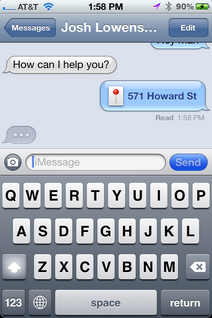
Apple takes a shot at BlackBerry with this instant messaging app that will work across all iOS 5 devices. As with BlackBerry Messenger (BBM), you'll be able to exchange unlimited text messages, photos, and videos with your friends, family, and colleagues. Also, your messages won't cost you anything and they won't count against the monthly allotment of messages from your wireless carrier.

You'll also get group messaging, an indicator to see if someone is typing to you, delivery and read receipts, secure encryption, and conversation syncing that is pushed to multiple devices. iMessage will work on 3G and Wi-Fi networks.

The updates to the iPhone messaging system are welcome changes, with some of the new features mimicking what third-party paid chat apps in the iTunes App Store already do. We're a little disappointed that the location and contact sharing features don't come straight from iMessage (you need to share them from the Map app or your contacts) as found in third-party apps. Still, the ability to send that data to a friend is an improvement. For example, to send a contact, you'll need to go to your home screen, open your contacts, select a person, choose the Share Contact button, then choose iMessage. It would have been better if we could bring up the contact list straight from iMessage. We will be comparing these features more in depth to BlackBerry Messenger (BBM) later this week.
  • Share this
  • Sumbit to Digg
  • Sumbit to StumbleUpon
  • Sumbit to Delicious
  • Sumbit to Technorati
  • Sumbit to Reddit
  • Sumbit to Mixx
  • Sumbit to Twitter
  • Sumbit to Furl
  • Sumbit to Design Float
  • Sumbit to Blinklist
  • Sumbit to Yahoo Buzz
  • Sumbit to Google Bookmarks

iOS 5 upgraders reporting installation hiccups


Despite getting off to a smooth start, some users are experiencing problems upgrading to Apple's latest version of iOS. 

Numerous users on Twitter and Apple's support forums are now reporting issues downloading the new version of the iOS software. The Next Web notes that most users with problems are getting a 3200 error, with the message that an "internal error" occurred, and that the upgrade process has been canceled as a result.

Other users--including at least one CNET editor--have run into problems after successfully downloading the update, with iTunes spitting out an error message as the file was extracted.

This is not the first time an iOS update has brought hiccups for first-day upgraders. Last year's iOS 4.0.1 rollout, a minor update that adjusted how the iPhone calculated and displayed its signal bars to users, resulted in many people not being able to install the update on top of the initial version of iOS 4.

Apple did not immediately respond to a query about the issues. We'll update this post when we know more.

Update at 2 p.m. PT: Razorianfly points out that you can grab the firmware update file directly from Apple if you were planning to do a restore, and are experiencing slowness on the download through iTunes.

Below are direct links to those files, which you can use to update your device by holding Alt (Windows)/Option (Mac) and clicking the "restore" button in the iTunes iOS device summary screen, then pointing to the file that matches up with your device. Worth noting is that this will wipe your iOS device to factory settings, so either be patient if you plan to use the update button in iTunes, or back up your device in iTunes first.

  • Share this
  • Sumbit to Digg
  • Sumbit to StumbleUpon
  • Sumbit to Delicious
  • Sumbit to Technorati
  • Sumbit to Reddit
  • Sumbit to Mixx
  • Sumbit to Twitter
  • Sumbit to Furl
  • Sumbit to Design Float
  • Sumbit to Blinklist
  • Sumbit to Yahoo Buzz
  • Sumbit to Google Bookmarks

11 October 2011

Blackberry Servers DOWN AGAIN!!!

Research In Motion (RIM) has said it is investigating the reason why email services were disrupted for millions of BlackBerry owners in Europe, Africa and the Middle East, due to a crash that allegedly originated from a RIM data centre in Slough.

Although emailing services do appear to be back to normal, the company has warned that Internet browsing and instant messaging services such as BBM may continue to run slower than usual until the problem is resolved entirely.

When the disruption broke yesterday afternoon (10th October), the company released the following statement: “Our technical teams are working to return services to normal operation as quickly as possible. 

“We apologise to our customers for any inconvenience and we will continue to provide updates as new information becomes available.”

Although many personal mobile users were affected by the outage, it’s believed that the inconvenience to corporate phone owners is restricted, owing to the fact that BlackBerry has two separate servers for consumers and businesses.

The bad news is the latest in a string of negative press for RIM, with the media continually reporting on how the company’s BlackBerry brand is losing market share to rivals such as HTC and the Apple iPhone, which is beginning to develop ties with corporate clients owing to strengthened security for business email that rivals the encryption standards, which made BlackBerry a favoured brand in the first place.

Stuart Miles of tech blog Pocket-Lint.com offered this analysis: “”If you have got companies that are shifting their allegiance to other players in the market and you stop being able to provide them that concrete, reliable service, then that’s going to have a detrimental effect.”
  • Share this
  • Sumbit to Digg
  • Sumbit to StumbleUpon
  • Sumbit to Delicious
  • Sumbit to Technorati
  • Sumbit to Reddit
  • Sumbit to Mixx
  • Sumbit to Twitter
  • Sumbit to Furl
  • Sumbit to Design Float
  • Sumbit to Blinklist
  • Sumbit to Yahoo Buzz
  • Sumbit to Google Bookmarks

Facebook realeases its iPad App

It's been a long, long time coming, but Facebook has finally unveiled its iPad app, reports This Is My Next. At time of writing it wasn't live in the App Store, but check back very soon and it should be there, ready for download.

So what can you expect? Well the bad news is it's lacking the new Facebook features unveiled at the recent f8 conference, such as Timeline. But it does include a lot of favourites features, and it looks very similar to the iPhone version.

You've got Chat on board, full-screen games, and News Feed notifications. It and the iPhone app are also getting an upgrade, adding new features previously unavailable. Such as? The ability to add bookmarks to apps, pay using Facebook Credits for in-app payments, and there's a new Requests dialogue that shows app notifications, such as invitations to join in games. These features aren't available as yet -- they've only just been pushed out to developers -- but it shouldn't be long till we can take advantage of them.

Good news for non-Apple users too -- these new features are also bound for Android. Sweet

Previously these features were only available on websites or apps through Facebook.com. Writing on a blog entry announcing the launches, Facebook software development engineer Luke Shepard wrote: "We are at the beginning of bringing Facebook Platform apps to mobile. The features we are launching today are still under development. They will evolve as we learn more about building richer social experiences on mobile devices."

The Facebook iPad app has been in development for some time, with Mark Zuckerberg himself said to be personally involved.
  • Share this
  • Sumbit to Digg
  • Sumbit to StumbleUpon
  • Sumbit to Delicious
  • Sumbit to Technorati
  • Sumbit to Reddit
  • Sumbit to Mixx
  • Sumbit to Twitter
  • Sumbit to Furl
  • Sumbit to Design Float
  • Sumbit to Blinklist
  • Sumbit to Yahoo Buzz
  • Sumbit to Google Bookmarks

13 September 2011

RIM unveils BlackBerry Bold 9900, 9930

Research In Motion today introduced the latest additions to its Bold series of smartphones, the RIM BlackBerry Bold 9900 and the BlackBerry Bold 9930. 

The devices look very much like the company's traditional QWERTY handsets, but throw a 2.8-inch, VGA (640x480) capacitive touch screen into the mix. They will also run the latest BlackBerry 7 OS, which brings support for augmented reality applications via a built-in magnetometer and faster browser and graphics performance, and feature a 1.2GHz Snapdragon processor and NFC (near field communications) technology for mobile payments. 

RIM said these are the thinnest BlackBerrys to date and highlighted the phones' 5-megapixel camera with 720p HD video recording capabilities and 8GB of internal memory. 

The smartphones all have Bluetooth, Wi-Fi, and GPS, with the BlackBerry Bold 9900 offering quad-band GSM, tri-band HSPA+ support and the BlackBerry Bold 9930 offering dual-mode CDMA/EV-DO Rev. A/GSM support. Both are expected to ship worldwide this summer, and it looks like T-Mobile has already committed to bringing the BlackBerry Bold 9900 to market later this year as its first 4G-capable BlackBerry.
  • Share this
  • Sumbit to Digg
  • Sumbit to StumbleUpon
  • Sumbit to Delicious
  • Sumbit to Technorati
  • Sumbit to Reddit
  • Sumbit to Mixx
  • Sumbit to Twitter
  • Sumbit to Furl
  • Sumbit to Design Float
  • Sumbit to Blinklist
  • Sumbit to Yahoo Buzz
  • Sumbit to Google Bookmarks

20 August 2011

Windows 8 Reviews: Is Microsoft's Tablet Strategy On Track?

Microsoft has taken the wraps off of Windows 8 to offer a peek at the operating system many say is one finally optimized for tablets and Microsoft's boldest reinvention in years.
An OS made for touch use, Windows 8 resembles the Windows Phone 7's software, using tiles that let users swipe through rather than click to navigate. It has been called the most dramatic redesign of Microsoft's Windows operating system in years, with Microsoft pitching at the "first attempt to rethink the basic operating system's layout since Windows 95," according to VentureBeat.

Initial response to Windows 8 focuses on the idea that Microsoft has at last delivered an operating system made for the tablet. Microsoft has long struggled to produce a competitor to the dominant device in the field, the iPad, or for that matter, to produce a competitive tablet of any sort. Here's what people are saying about Windows 8, demoed at the D9 conference, so far.

"The most noticeable difference is a new layout that was clearly inspired by Windows Phone 7," wrote VentureBeat.

People agree that whatever it is, it's definitely new. All Things D's Walt Mossberg said that Windows users may be "shocked" by the "pretty radical" changes. Technologizer's Harry McCracken dubbed Windows 8's "look and feel" to be "New. New, new, new, new, new!"
Crunchgear notes that "while they're retaining support for all the major applications and enterprise features, the new interface is meant to be fresh, fast, and accessible." But, they caution, Microsoft must be careful that its "full-on Windows environment will be neither too stripped-down for power users, nor too clunky for people expecting a simple tablet interface."

McCracken suggests that it may not be possible to fully anticipate the hardware that will run Microsoft's Windows 8 software.

"This is going to run best on PCs which don't exist yet, for the most part," he writes. "Something like an HP TouchSmart will be well-suited to it. Possibly a convertible notebook along the lines of a Tablet PC, too. But I can't quite see how it'll make sense on a garden-variety notebook or desktop. Or, for that matter, on a garden-variety tablet-at least if you intend to run old-style apps as well as touch-centric ones. It wants a new type of computer."

There may be restrictions in how the operating system is brought to market.
According to Bloomberg Microsoft has imposed some limits on how the operating system can be used, reportedly asking "chipmakers that want to use the next version of Windows for tablets to work with no more than one computer manufacturer." But while such restrictions could help Microsoft quicken its delivery of new Windows tablets, Bloomberg observes that "the restrictions may impede chip- and computer makers from building a variety of Windows-based models."

Ars Technica warns that such restrictions could become problematic.

"If Microsoft sets the specification too low--either as a deliberate ploy to protect full-featured laptops, or as a failure to keep up with technological advances--then Windows tablets will be undesirable and uncompetitive out of the gate," they wrote.
Some critics wondered whether Microsoft's strategy to provide the same software for both traditional PCs and mobile devices could prove to be its downfall.
Gizmodo writes:
Maybe the way Microsoft's gonna translate touch apps to keyboard/mouse and keyboard/mouse apps to touch to achieve this infinite OS will be downright magical in the end. But I'm not seeing this hybrid thing right now, even as impressed as I am by all of the incredibly cool modern interface stuff that's totally designed for tablets. And beyond that, at least when we're talking about tablets, it looks like Windows 8 still has a lot of the rest of the problems that made the current Windows less-than-good as a tablet OS--or it doesn't have the things that makes the other tablets as good as they are. Namely, utter simplicity.


And PCWorld points out that Windows 8 may suggest an overarching trend for software as companies try to accommodate the needs of both mobile and wired devices for the future.
"What's interesting about Windows 8 is that it's another step in PCs becoming more tablet-like. Apple is moving toward making Mac OS X more iPad-like with Lion's various iOS-inspired features, although Windows 8 seems to go one step further with merging the tablet and the PC," they wrote.

But if Microsoft can pull it together, it could pose a real threat to Android tablets, according to Sarah Rotman Epps of Forrester.

"Consumers prefer Windows to Android on tablets by a wide margin," she wrote. "If Windows 8 tablets hit the market in 2012, they'll be competing against third-generation iPads--no easy feat, and we expect Apple to maintain at least 70% market share into next year. But Microsoft will be a contender. What's more, they'll have a product that can compete across devices, and a foothold in the post-PC future."
  • Share this
  • Sumbit to Digg
  • Sumbit to StumbleUpon
  • Sumbit to Delicious
  • Sumbit to Technorati
  • Sumbit to Reddit
  • Sumbit to Mixx
  • Sumbit to Twitter
  • Sumbit to Furl
  • Sumbit to Design Float
  • Sumbit to Blinklist
  • Sumbit to Yahoo Buzz
  • Sumbit to Google Bookmarks

How to clean your smartphone or tablet

Do you wash your hands before you handle your smartphone or tablet, each and every time? Chances are, your device could use a good cleaning. Here's how to safely clean your smartphone or tablet:

How do I safely clean the screen on my smartphone or tablet?
To clean the screen on your smartphone or tablet, use a soft, lint-free cloth. We suggest you pick up a couple of microfiber cloths. Never use a paper towel or other paper-based towels as they can leave scratches on the screen. For fingerprint smudges, dust, and lint, wipe the screen gently using a dry microfiber cloth.

What if I got ink, food, or makeup on the screen?
For more stubborn contaminants or stains, turn your device off and remove the battery if possible. Lightly dampen a section of a microfiber cloth with water and gently wipe the screen, then go over it again with a dry section of the cloth to wipe away any moisture.   Avoid getting moisture in any openings like the speaker or mic.  If the stain remains, you can also try using a mild soap-and-water solution.  When your device is completely dry, put the battery back in and turn it on.

Can I use Windex or other household cleaners to clean my device?
Never use window cleaners, harsh chemicals or cleaning solvents on your smartphone or tablet and never spray anything directly onto the screen.  Some screens, like those on the iPad and iPhone, have a special coating that can get wiped away if you use chemicals to clean the screen.

What if my device gets wet? Can I use a hair dryer or uncooked rice to dry it?
If your smartphone or tablet happens to get wet, turn it off immediately and remove the battery if possible. Let it dry for as long as you can before turning it back on and never use a hair dryer, oven or microwave to try and accelerate the drying.  Some people have claimed that leaving a wet device in a bowl of uncooked rice helps get the moisture out of the device, but your mileage may vary.  There are also a couple of companies that make kits that claim to dry out wet devices.  One such kit is called the "Dry-All First Aid Kit" and is available from Amazon.com. For more on rescuing wet cell phones, check out
Sharon Vaknin's How To video.

There, now you know how to clean your smartphone or tablet.  If you've used one of those drying kits or tried the uncooked rice method to dry out a wet device, let us know how it worked out for you in the comments.
  • Share this
  • Sumbit to Digg
  • Sumbit to StumbleUpon
  • Sumbit to Delicious
  • Sumbit to Technorati
  • Sumbit to Reddit
  • Sumbit to Mixx
  • Sumbit to Twitter
  • Sumbit to Furl
  • Sumbit to Design Float
  • Sumbit to Blinklist
  • Sumbit to Yahoo Buzz
  • Sumbit to Google Bookmarks

How to clean and disinfect your keyboard and mouse

Studies have shown that computer keyboards can have more bacteria than toilet seats. Given that little tidbit of information, you might want to consider cleaning and disinfecting your keyboard more often, especially if you share your keyboard and mouse with others. Here's how:

Cleaning and disinfecting your keyboard

Cleaning
Step 1: Unplug your keyboard from your computer and remove any batteries.

Step 2: Flip it upside down and give it a good couple of shakes.

Step 3: Blow some compressed air to remove crumbs, dust, and other fun stuff from between the keys.


Step 4: If you happen to have a mini vacuum that's designed to clean keyboards, feel free to use it, but refrain from using a full-size vacuum; you might find your keys in the vacuum's dust bin.

Step 5: Wipe the keyboard keys and palm rest with a lightly dampened lint-free cloth, like a microfiber cloth.


Step 6: Using a dry microfiber cloth, remove any remaining moisture from your keyboard


Disinfecting
Step 1: Unplug your keyboard from your computer and remove any batteries.


Step 2: Wipe your keyboard with disinfectant wipes. Make sure that the wipes aren't overly damp and that you squeeze out any excess liquid before wiping the keyboard.

Step 3: Then immediately wipe your keyboard down with a lightly dampened microfiber cloth.


Step 4: Using a dry microfiber cloth, remove any remaining moisture from your keyboard.


Cleaning and disinfecting your mouse

Cleaning
Step 1: Unplug your mouse from your computer and remove any batteries.


Step 2: Use a lightly dampened microfiber cloth to wipe away grime or dirt. Be careful not to get moisture into any openings.

Step 3: Using a dry microfiber cloth, remove any remaining moisture from your mouse.

Step 4: If there are loose particles stuck underneath the scroll wheel, turn the mouse upside down and roll the scroll wheel to help dislodge anything that may be stuck inside.

Disinfecting
Step 1: Unplug your mouse from your computer and remove any batteries.

Step 2: Wipe your mouse with disinfectant wipes. Make sure that the wipes aren't overly damp and that you squeeze out any excess liquid before wiping the mouse. Take care to avoid getting moisture into any openings.


Step 3: Then immediately wipe your mouse down with a lightly dampened microfiber cloth.


Step 4: Using a dry microfiber cloth, remove any remaining moisture from your mouse.


The directions above apply to laptop keyboards and touch pads as well. Just remember to turn your laptop off, unplug the power cord, and remove the battery. You'll also want to be careful not to allow any excess moisture to enter any openings and never spray anything directly onto your keyboard, mouse, or laptop.

Oh, and just in case you're thinking about tossing your keyboard in the dishwasher, we don't recommend it. Putting it in the dishwasher or submerging it in water will likely short-circuit the wiring. We also don't recommend that you disassemble your keyboard to clean it. Most manufacturers discourage users from disassembling keyboards, including removing keys. Doing so will probably void your warranty.

Credit: CNET
  • Share this
  • Sumbit to Digg
  • Sumbit to StumbleUpon
  • Sumbit to Delicious
  • Sumbit to Technorati
  • Sumbit to Reddit
  • Sumbit to Mixx
  • Sumbit to Twitter
  • Sumbit to Furl
  • Sumbit to Design Float
  • Sumbit to Blinklist
  • Sumbit to Yahoo Buzz
  • Sumbit to Google Bookmarks

HP has suffered from Apple envy

Commentary Maybe you can blame Apple for the mess at Hewlett-Packard.


HP, like so many other tech companies, has had Apple envy for the last few years. But also like so many others, it's proved no match for Apple's design and marketing machine. And today, HP paid the price for that inability. It gave up on WebOS, the mobile operating system it acquired to compete directly with Apple's iOS. And it announced plans to rid itself of its PC business.


After HP dominated the PC market, Apple began nipping at it and other PC makers heels. This, combined with margins in the PC business going from bad to worse, put HP on the defensive. What resulted was a series of reactionary products and business moves.


You can almost pinpoint the start of the me-too downfall to the launch of HP's Envy 13, a luxury laptop HP introduced a little more than a year and a half after Apple's first MacBook Air. It too was thinner and lighter than most notebooks at the time, and a departure from HP's consumer efforts, though it came at a hefty price premium.


Instead of whittling away the size and price, as Apple's done with the Air, HP eventually killed off the 13-inch model of the Envy to focus instead on larger and heavier versions that were more budget-friendly. By comparison, Apple's cut away at the price of the Air, while slowly adding features. That culminated with the company recently deciding to make the 11.6-inch Air its entry-level portable computer, dropping the plastic MacBook, a machine that was once its best-seller.

Then there are phones and tablets. With Apple and Google ramping up their mobile platforms, and whittling away at the market share of Research In Motion, Nokia, and Microsoft, HP was forced to make a decision: stay tied to Microsoft's Windows Mobile (a platform that Microsoft eventually killed in favor of Windows Phone 7), scrap its phone hardware business, or be like Apple and do it all in-house.

The solution was to spend $1.2 billion on Palm and its WebOS platform. With that buy, HP suddenly made both its own smartphones and smartphone software, all in the same ecosystem. Better yet, it wasn't beholden to other companies in order to spur its own innovations. With the Palm buy, HP was also buying a piece of Apple: Palm CEO Jon Rubinstein, a longtime Apple employee who was one of the creators of the iPod, was put in charge of HP's mobile device efforts.

WebOS was scheduled to bridge the divide to HP's computers, effectively replacing Microsoft's Windows operating system with one HP would be making in house. While not exclusively an Apple strategy, that too is one that became especially enviable for HP, given the chance to increase its margins by cutting Microsoft out of the picture. In fact, that's one of the places where HP promised to out-Apple Apple itself, providing a single platform for developers to make apps on for both desktop and mobile users.


The problem is, HP isn't Apple. It's a giant, diverse company that makes everything from corporate software to phones. That's a lot under one roof, more than even at IBM, not to mention HP is on its third CEO in the past decade. None of those changes can be good for the culture. Now let's compare that to Apple.

Apple started off small, making computers, later expanding into additional product categories. Though for the past decade it's been all about the consumer, with those consumer products then bleeding into the enterprise. That whole time though, Apple's been careful to keep its product line tidy, making incremental improvements almost on a cycle, while at the same time creating a cult-like fascination out of it. That kind of mojo is impossible to replicate, though rivals including Google have gotten better at it.


The products themselves are entirely Apple, soup to nuts across the board. Apple controls the design, the hardware, the software, where you buy it (including how you see it--even when it's not in an Apple store), and staffing the people that can fix your hardware or software problem if and when it comes along. The hope is that your next phone or computer will be from Apple, and if Apple decides to venture into another territory, those same customers might come back. That's something that's hard for anyone, let alone HP to match.


Can another big tech company compete with Apple? Sure, the likely culprits are Google and its partners, or Microsoft and its partners. It's hard to say. One of Apple's biggest threats at the moment is itself, particularly in regards to how much longer it can continue to ride its success. One thing we do know: that big challenger won't be HP.

 
  • Share this
  • Sumbit to Digg
  • Sumbit to StumbleUpon
  • Sumbit to Delicious
  • Sumbit to Technorati
  • Sumbit to Reddit
  • Sumbit to Mixx
  • Sumbit to Twitter
  • Sumbit to Furl
  • Sumbit to Design Float
  • Sumbit to Blinklist
  • Sumbit to Yahoo Buzz
  • Sumbit to Google Bookmarks

02 August 2011

iPad users finally get Skype app

iPad users can finally get their hands on a native Skype app. For real. 

More than a month after it was expected to make its official debut, the iPad-optimized Skype client began appearing in Apple App Stores on August 1. The new app takes advantage of the tablet's larger screen real estate, making for crisp and clear video chat over Wi-Fi, and often less crisp chat over 3G. 

However, not long after the app appeared, Skype pulled it, saying it was released prematurely. "To ensure your best Skype experience, we've temporarily removed Skype for iPad which went live prematurely today," Skype said on its Twitter feed. "We know you've been eagerly awaiting Skype for iPad and apologize for the inconvenience." 

Then some hours later, on the morning of August 2, Skype proclaimed again that Skype is available for download. 

Skype had whetted iPad owners' appetite in June when it posted a video of its not-yet-released iPad application to its YouTube channel before quickly setting it to private. 

The video demos the application's video chat capabilities, which rival that of Apple's built-in FaceTime service with a window for both the person you're chatting with, and one to view yourself in. Also included is standard phone dialing and integrated text-chat, the latter of which can be used during a video chat. 

The big difference from Apple's own FaceTime service is that Skype's application brings video chat over 3G networks. FaceTime currently only works over Wi-Fi, something Apple has said will change eventually. 

CNET's Josh Lowensohn contributed to this report.
 

  • Share this
  • Sumbit to Digg
  • Sumbit to StumbleUpon
  • Sumbit to Delicious
  • Sumbit to Technorati
  • Sumbit to Reddit
  • Sumbit to Mixx
  • Sumbit to Twitter
  • Sumbit to Furl
  • Sumbit to Design Float
  • Sumbit to Blinklist
  • Sumbit to Yahoo Buzz
  • Sumbit to Google Bookmarks

21 July 2011

EA predicts the death of in-store game buying

Electronic Arts believes the end is near for in-store game buying.

Speaking to Eurogamer in an interview published yesterday, EA Sports Vice President Andrew Wilson said there will be a time when gamers decide against heading to a local game retailer, and get all their titles digitally instead.

"There will come a day where I think that people will stop going into [U.K. game retailer] Game and GameStop," Wilson told Eurogamer. "And I use those purely as examples of retail. It's important for retailers and us to understand what the consumer wants in the future."

Wilson didn't say when he believes brick-and-mortar stores will fall to digital marketplaces.
Of course, EA has a vested interest in seeing that happen. Last month, the company announced the launch of Origin, a direct-to-consumer digital-download service. The offering allows users to buy digital games and download them directly to their computers. At launch, Origin offered 150 games.

Origin is one part of EA's long-term strategy to transition away from the traditional packaged-goods model. EA CEO John Riccitiello said recently that he plans to make EA an entirely digital company in the future.

"Over the coming years, we will transform EA from a packaged goods company to a fully integrated digital entertainment company," Riccitiello told investors during an earnings call in May. "We're transforming EA to a games-as-a-service model."

Most recently, EA bolstered its digital portfolio by announcing its intention to buy PopCap Games for $650 million in cash and $100 million in stock.

EA is already seeing its digital revenue jump. During its last fiscal year, ended March 31, EA's digital-games revenue grew by 46 percent year over year to more than $800 million. The company is currently forecasting that revenue to grow to over $1 billion this fiscal year.
As EA benefits from the digital push, it would seem that game retailers, such as GameStop, would not. But so far, that hasn't been the case.

According to Wedbush analyst Michael Pachter, GameStop revealed during Investor Day earlier this year that the company expects to "grow its [digital] sales at a 50 percent compound annual growth rate" over the next several years. During the fiscal year ended January 31, GameStop generated $300 million in digital games revenue, and expects that to grow to $1.5 billion in four years.

Digital content is taking the gaming industry by storm. In March, the NPD Group, which releases official monthly sales data for the industry, announced that its digital-sales reports would go monthly owing to the growth of that market segment. According to NPD's Anita Frazier, digital content now represents 40 percent of all industry sales each month.
  • Share this
  • Sumbit to Digg
  • Sumbit to StumbleUpon
  • Sumbit to Delicious
  • Sumbit to Technorati
  • Sumbit to Reddit
  • Sumbit to Mixx
  • Sumbit to Twitter
  • Sumbit to Furl
  • Sumbit to Design Float
  • Sumbit to Blinklist
  • Sumbit to Yahoo Buzz
  • Sumbit to Google Bookmarks

How Lego changed the world of toys


BILLUND, Denmark--Though it's hard to imagine a time without Lego, the world-famous plastic bricks didn't exist until 1949. And today's brick, with its three little tubes that ensure a snug fit with other bricks, didn't come on the scene until 1957. 

But the Lego company has been around much longer than that. It may be something most people have never even heard about; Ole Kirk Kristiansen's little outfit began in this small Danish town as a one-man operation turning out wooden toys. Being a world-famous brand was surely not on Kristiansen's mind at the time. 

Nearly eight decades of Lego history is on display for those lucky enough to get to visit to what is essentially the company's official museum (see photo gallery below), housed in the company's original building in Billund. And while Lego twice lost its factory to fire--the second time forcing its leaders to abandon making wooden toys--it's still possible to get a sense of what the company was about in its earliest days. 

The history of Lego is really the history of the Kristiansen family. Privately run, the company was helmed by Kristiansens for three generations. It has only recently taken on its first nonfamily CEO. All told, it has 9,900 employees, and just a single brand. But of course, as far as most people are concerned, the real history of the company goes back only as far as those first plastic bricks. 

For years after the original hollow bricks came out, Lego tried to find a way to get them to stick together better. While the bricks did OK if they were stacked directly on top of each other, they weren't all that stable, and you couldn't have them stacked in any unusual ways. In 1957, the company finally figured out that with the three little tubes on the inside, the bricks would lock together perfectly, and could be stacked in a million different ways. 

Actually, my host told me, it's a lot more. If you have six 2x4 Lego bricks of the same color, they can be stacked 915,103,765 different ways. We didn't have time to try them all. (LOL)


  • Share this
  • Sumbit to Digg
  • Sumbit to StumbleUpon
  • Sumbit to Delicious
  • Sumbit to Technorati
  • Sumbit to Reddit
  • Sumbit to Mixx
  • Sumbit to Twitter
  • Sumbit to Furl
  • Sumbit to Design Float
  • Sumbit to Blinklist
  • Sumbit to Yahoo Buzz
  • Sumbit to Google Bookmarks

 
Design by Free WordPress Themes | Bloggerized by Lasantha - Premium Blogger Themes | Blogger Templates